Skill targets and steps
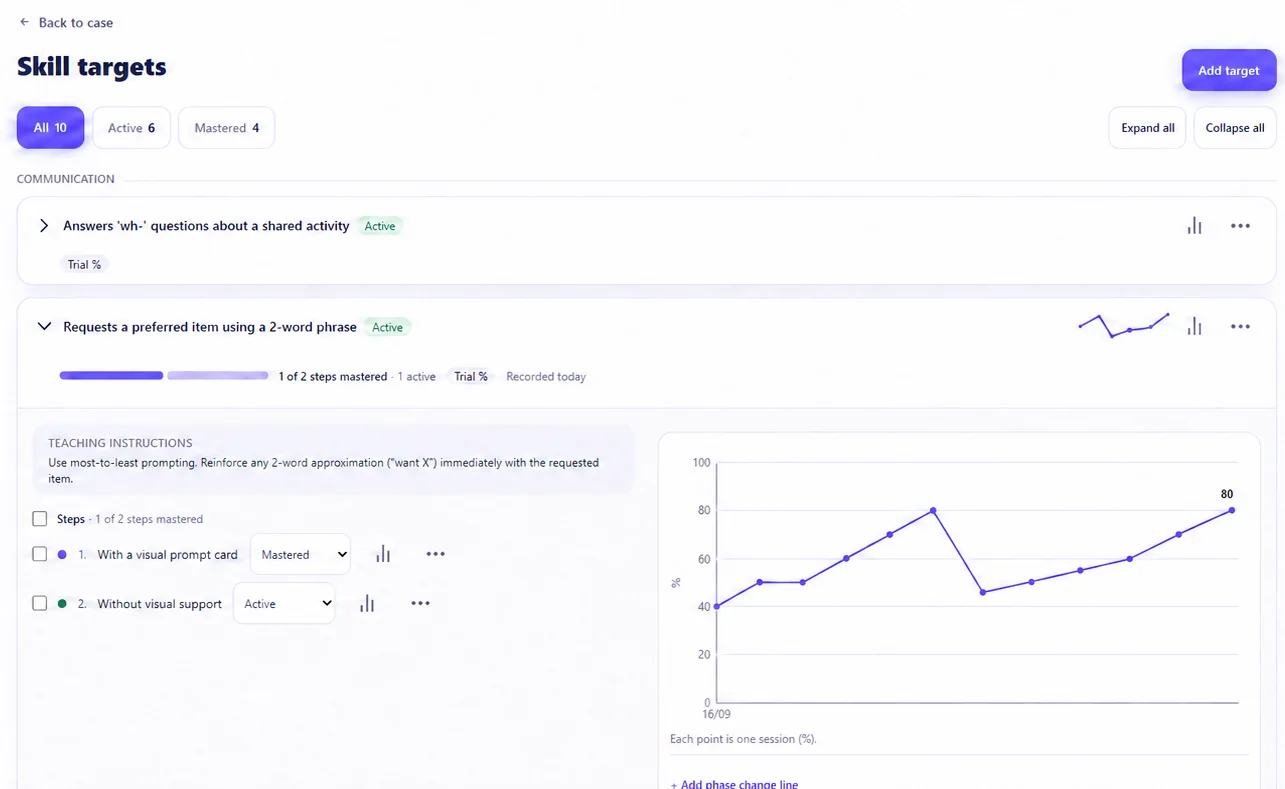
Group skill targets by area, break each one into steps, and add teaching instructions that the person running the session can see. Each step is marked as active or mastered.
ABA data collection software
In HapMetrix, the behaviour analyst sets up the targets, signed-off tutors and family members record data against them (online or off), and that data is saved to the case it belongs to. Progress can be reviewed straight away, and nothing needs re-typing from a sheet.
A typical UK ABA case involves a supervising behaviour analyst (UKBA(cert) or BCBA), one or more tutors or practitioners, and a family. Data collection works best when all of them are working from the same case record.
Sets up skill and behaviour targets, decides who is signed off to record data, reviews the data by target and adjusts the programme.
Sees the programme once added to the case. After the practice signs them off, and with a working agreement in place, they record session data and notes.
Sees progress and session notes and is told when a tutor joins. Can also be signed off to record data, for example during a parent-run session.
Group skill targets by area, break each one into steps, and add teaching instructions that the person running the session can see. Each step is marked as active or mastered.
Each behaviour target has an operational definition and a hypothesised function (escape, attention, tangible, sensory, multiple or unknown). It sits alongside presenting concerns, functional assessments and behaviour support plans.
Target libraries support repeatable programme setup, while each case’s own targets and progress remain case-specific.
Sessions are recorded from within the case. Start a session while the work is happening, or log a past session afterwards. Only people the practice has signed off for data entry can record, and only on cases they belong to.
Every data point and behaviour event is saved on the device the moment it is entered, then synced when a connection is available. If the signal drops in a family home or a school, recording carries on, and a session can’t be completed until its data has synced.
Once a session record is closed, changes go through an edit request rather than overwriting the original, which keeps a clearer history of the clinical record.
Six data types: yes/no, trial percentage (correct out of total), task analysis with a prompt level per step, prompt hierarchy (I, VP, GP, PP, HOH), duration and frequency.
Seven measurement types: frequency, duration, latency, intensity, partial interval, whole interval and momentary time sampling, plus antecedent–behaviour–consequence (ABC) records.
Each session’s note sits with its data, so the context and the numbers are kept together in the case history. The client contact can read the clinician’s session notes.
Because data is recorded against targets, progress is visible without anyone compiling it by hand. Target charts plot one point per session. Phase-change lines can be added to mark when the programme changed, and the case overview shows steps mastered, active targets and the most recent sessions. The behaviour analyst can review, then move steps on or change the programme, all within the same case. Sub-target progression can also be delegated to signed-off tutors and family members who record day to day. For meetings with families or other professionals, a branded progress summary can be exported as a PDF.
Access to case data is tied to practice membership, role and case capabilities, which control actions such as clinical recording. Recording needs an explicit data-entry sign-off. Functional assessments are withheld from tutors, and the family can block a tutor’s access. Multi-factor authentication is enforced for applicable accounts, and case history and audit records cover relevant activity. HapMetrix supports your governance but does not replace your practice’s own policies or professional judgement.
The case you collect data in is the same case that holds the signed agreement, documents, sessions awaiting billing and invoices. As a result, HapMetrix also works as ABA practice management software, covering everything from the first enquiry to discharge and archive.
Limited-time founding offer: founding practices get their first three months free, with no payment required to start. After that, Flexible Monthly is £6 per open case each month with unlimited practitioners. Prices exclude VAT.
Book a 20-minute founder walkthrough ↗